ReceiptVault did not become difficult because the app had a complicated user interface. It became difficult because the real world is hostile to clean data. Receipts are narrow, curved, faded, folded, photographed under bad light, printed in many languages, filled with tax summaries, loyalty text, terminal metadata, discounts, refunds, barcode-like numbers and totals that are sometimes split across several lines. A simple OCR demo can recognize text. A production app has to decide which text is true.
The project therefore evolved through three practical versions. These are not merely marketing releases. They are engineering eras: first the foundation, then the recognition engine, then the production-grade platform. Each version solved a different class of problem, and each exposed the next layer of complexity.
Version 1
The Foundation
A Swift package, domain model, parser, export layer and SwiftUI shell that made receipts testable before the camera and sync layers existed.
Version 2
The Intelligence Engine
Vision OCR, Core ML classifiers, YOLO-style layout zones, item-line assembly, validation gates and local learning replaced naive parsing.
Version 3
The Production Platform
Core Data, CloudKit, backups, share extensions, exports, archive metadata, macOS, audits and training apps turned the recognizer into a product.
The Starting Constraint: Private, Local and Verifiable
The most important architectural decision came before the scanner: ReceiptVault had to be useful without uploading personal financial documents to a server. That ruled out the easy path of sending images to an online OCR or language model service. The production app would rely on Apple Vision, VisionKit, Core ML, Swift parsers and deterministic validation, all running locally. iCloud could sync the user's private archive, but there would be no ReceiptVault backend.
That privacy constraint shaped every later process. Training data was handled as local project material. Review corrections were stored as local examples. Candidate models were promoted only after reports and regression checks. Even the Apple Foundation Models layer was designed as an optional local review pass with strict JSON schema validation and a fallback to the bundled receipt model.
Version 1: Building the Bones Before the Camera
The first version was deliberately unglamorous. Instead of starting with a camera screen and hoping the rest would follow, the project began with a testable Swift package named ReceiptVaultCore. This package held the domain model, receipt parser, categorizer, duplicate detector, export code and later most of the recognition and persistence logic. The initial goal was simple: make the receipt data model executable and testable without depending on the simulator, camera permissions or live OCR.
The core model grew around ParsedReceipt: merchant, address, purchase date, currency, total, subtotal, tax, payment method, receipt number, OCR text, notes, line items, scan assets and review status. From there the project added TSV export, Excel export, duplicate grouping, category inference, deadline reminders and quality validation. The app UI could now work with receipts as real records, not as loose OCR strings.
The SwiftUI shell followed the same principle. iPhone used a tab structure for Archive, Scan, Insights and Settings. iPad used a sidebar and split navigation model. Views were built with system containers such as TabView, NavigationStack, NavigationSplitView, List and Section rather than a custom UI framework. That kept the app native, accessible and measurable.
The first major process decision: treat the app as a product of small verifiable layers. Domain tests came before camera integration. Parser behavior was locked down with fixtures. The Xcode project was generated and protected by scripts. Build and test commands were captured so the project could be reproduced instead of manually nursed inside Xcode.
Tooling in Version 1
- Swift 6 and SwiftPM for the shared core module.
- Xcode project generation through Ruby scripts, including source synchronization safeguards.
- XCTest for parser, exporter, archive and source-level regression checks.
- Simulator build scripts for iPhone and iPad verification.
- Fixture receipt images and text reconstruction to make parser changes measurable.
- A living implementation status document that tracked finished, in-progress and blocked work.
One early infrastructure hurdle was toolchain drift: the installed command-line Swift was not always aligned with the Xcode SDK. The workaround was explicit and repeatable: use xcrun swift test and the Xcode-selected toolchain for package commands. That sounds mundane, but it prevented false failures from masquerading as app regressions.
Version 2: From OCR Text to Receipt Understanding
The second version began when it became clear that OCR alone was not the product. Apple Vision can read many lines from a receipt, but it does not know which number is the final total, which line is a VAT base, which amount is a discount, which date is a terminal timestamp, or where the item block starts. ReceiptVault needed a receipt understanding engine.
The scan path used VisionKit for document capture on iPhone and iPad, preserving original scans as assets while OCR and processing could use cropped or rotated versions. OCR output became input, not truth. Recognized lines, line boxes, confidence values and later document-structure information were handed to a hybrid pipeline: local Core ML models proposed roles and regions, Swift parsers assembled candidates, and deterministic validators decided which candidate was acceptable.
This changed the project from an app with parsing rules into an offline machine-learning system. The codebase grew scripts for bootstrapping labels, training line classifiers, training detector and locator models, preparing YOLO datasets, evaluating unseen layouts, generating non-receipt negatives, auditing label structure, deriving specialist datasets and running post-training checks. The production app remained local and deterministic, but the development workflow became a loop of measure, isolate, label, train, compare and promote.
The Recognition Pipeline
| Layer | Purpose | Representative Tools |
|---|
| Capture | Acquire receipt images while preserving originals for later review, sharing and backup. | VisionKit, AVFoundation, SwiftUI scan review, crop and rotation flows. |
| Text extraction | Recognize OCR lines, geometry, confidence and document structures. | Apple Vision OCR, fixed receipt-language recognition list, iOS 26 document structure where available. |
| Layout | Find receipt paper, merchant, item, total, VAT and payment zones. | YOLO/Ultralytics training, Core ML locator exports, structure audits, zone quality evaluation. |
| Semantics | Classify lines and amounts as merchant, item, total, VAT, payment, metadata or ignore. | Create ML/Core ML classifiers, JSON fallback model, field rankers, zone specialists. |
| Assembly | Build item rows, totals, tax breakdowns and payment facts from noisy line candidates. | Swift parsers, item row assembler, zone-first parser, line item arbiter. |
| Validation | Accept only outputs that obey receipt math and avoid terminal, barcode and tax traps. | Quality validator, currency detection, VAT-inclusive math, final total gates, regression fixtures. |
The Most Important Technical Shift: Validation Became the Boss
A model can suggest. A parser can infer. But the final receipt must balance. ReceiptVault eventually treated arithmetic validation as the gatekeeper: item lines should close against the final total, VAT should not be double-counted, subtotal and tax bases should not win over final totals, and payment or card metadata should not become purchase amounts.
That rule exposed subtle bugs. For European VAT-inclusive receipts, the correct check is usually total == sum(items), not total == items + tax. The latter double-counts VAT and can bless exactly the wrong total. Fixing that one rule changed the system from "looks plausible" to "mathematically honest" for a large class of receipts.
Other fixes were equally concrete: discount summaries stopped overriding final totals, column headers such as "Price" and "Total" stopped confusing item prices with receipt totals, tax basis rows stopped winning over payment totals, and split labels such as "Total" followed by the amount on the next line received special handling. These were not cosmetic parser tweaks. They were corrections to the app's model of reality.
Training Data, Without Fooling Ourselves
The project used several kinds of labels because not all training evidence deserves the same trust. Hand-accepted labels became gold. Vision and app-backup-derived examples were treated as bootstrap or silver data. Manual corrections were stored as traceable examples. The production line explicitly avoided overwriting accepted YOLO labels, and candidate models were supposed to be evaluated against fixed validation and test splits.
This mattered because receipt systems are very easy to accidentally overfit. One documented bug made zone-specialist training meaningless: the specialist input contained the answer-like label feature, giving the model an artificial echo. The fix removed the leaked label from both training and runtime input and forced specialists to earn their score from real features. Another cleanup removed hardcoded merchant shortcuts and OCR typo aliases. The result was more honest and temporarily more painful, but it made the remaining problems visible instead of hiding them behind cheats.
Representative model-quality numbers recorded during the effort
- A current on-device benchmark covered 728 receipts and 35,361 OCR lines.
- Reviewed parse expectations reached 545 matches out of 546 reviewed receipts, with one reviewed date mismatch still visible.
- Line classification accuracy was recorded at 96.3 percent.
- Average parsing time was recorded around 47.5 ms, with p95 around 81.4 ms on the local no-network pipeline.
- The release ambition remained higher than that: near-99 percent automation requires more verified real receipts and item-line labels.
Version 3: Turning a Recognizer Into a Product
The third version was about everything that makes a clever engine usable: persistence, sync, search, file import, backups, exports, settings, privacy manifests, app store notes, accessibility, performance, localization, macOS and operational tooling. This is where many prototypes collapse, because product engineering is mostly the work users do not see until it fails.
Persistence started with a local JSON archive because it was simple, inspectable and fast to evolve. That was correct for the early phase, but it was not enough for a private iPhone/iPad archive. The production direction moved to a repository abstraction with Core Data as the primary store and NSPersistentCloudKitContainer for private iCloud sync. The design explicitly kept original scan assets, checksums, thumbnails and receipt metadata coordinated rather than pretending that a receipt is just a row in a table.
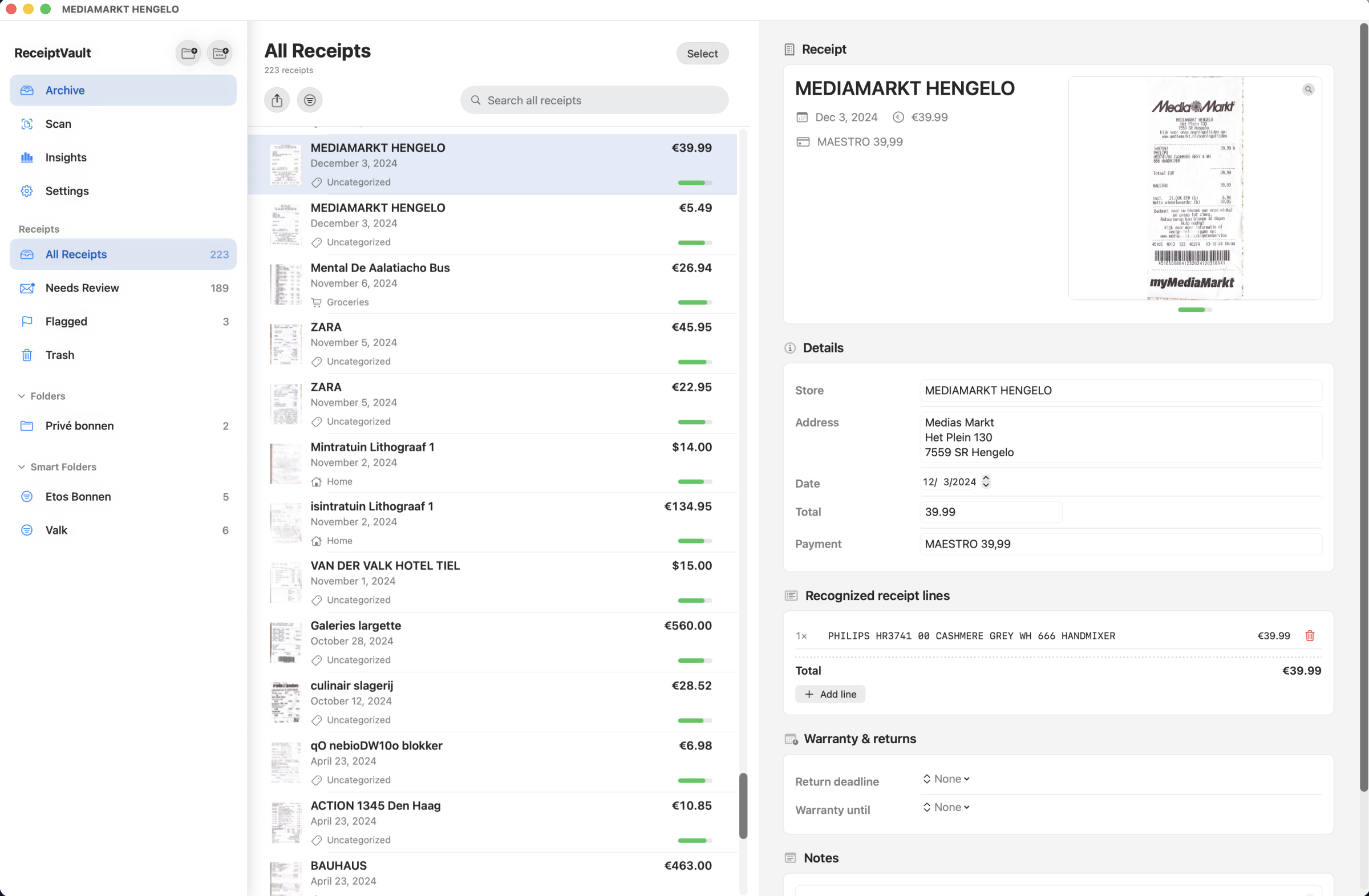
The archive also became more than a list. It adopted Mail-like organization: All Receipts, folders, smart folders, flags, scoped search, selection, move actions, export and mail handoff. Import expanded through Files, Mail, images, PDFs and text payloads. App Intents and deep links could route users to Archive, Scan, Insights and Settings. Spotlight and share-extension work made receipts feel like system citizens rather than trapped app data.
Core Data and CloudKit: The Hard Parts Were Operational
The Core Data decision was pragmatic. SwiftData is pleasant for prototypes, but ReceiptVault needed explicit migration control, binary asset handling, CloudKit debugging hooks, conflict handling and years of future schema evolution. Core Data gave those levers. The app could still expose a clean repository interface to the UI while the storage layer handled migration from JSON and restoration of missing scan files.
The operational risks were real. CloudKit schema initialization had to include programmatic entities such as receipt records, scan asset records, folders, markers and smart folders. Empty schemas produced partial failures. Production builds needed the CloudKit schema promoted to the production environment. Release entitlements had to use production APNs for silent sync notifications. These are not glamorous problems, but they decide whether sync works for real users.
Backups, Exports and the Cost of Original Scans
ReceiptVault stores financial records, so export and backup could not be an afterthought. The app added TSV export, real XLSX export, filtered archive export, selected receipt export, manual backup and restore, and share sheets. It also kept original scan pages rather than throwing away evidence after parsing. That is the right product decision, but it creates performance and storage work.
A production audit identified the trade-off clearly: storing scan images both on disk and as Core Data external-binary records doubles local storage, while full embedded JSON backups can spike memory because all scan bytes are materialized at once. The solution path was equally clear: move expensive repository and backup work off the main thread, stream or chunk large backups, cache thumbnails, and be deliberate about whether Core Data or the file system is the single source for scan bytes.
The macOS Version Was Not a Viewer
The macOS plan was intentionally ambitious: not a read-only companion, but a native desktop ReceiptVault that shares the same private iCloud archive and the same core logic. The interface uses a three-pane desktop structure: sidebar, receipt list and detail pane. The Mac target reuses the shared core, OCR/ML pipeline, archive, export, backup and sync logic while adapting presentation, commands, file import and camera capture for macOS conventions.
That added another layer of tooling: macOS entitlements, App Sandbox, user-selected file access, camera privacy strings, menu commands, Continuity Camera planning, native import panels and App Store multi-platform release considerations. It also proved the value of keeping ReceiptVaultCore separate from the app shells. Platform UI can differ; receipt intelligence should not.
The Engineering Processes Behind the Work
The project survived because it was not run as one giant burst of feature work. It used layered delivery, source audits, local scripts, fixtures, model reports and documented gates. Some of the most important assets were not user-facing screens. They were the scripts and reports that made the work measurable.
Build and Verification
SwiftPM tests, simulator builds, source-protection tests, project generator checks, localization linting, CI scripts and manual screenshot verification kept the product from drifting.
Data and ML Operations
The pipeline separated gold, silver and bootstrap labels, preserved sidecars, audited YOLO structures, trained local models and promoted artifacts only after comparison.
Product Hardening
Performance audits, privacy inventory, app-store notes, accessibility checks, sync diagnostics and release-blocker reviews made hidden failure modes visible.
Representative Tools and Techniques
- Swift and SwiftUI: app shells for iPhone, iPad and macOS, with native lists, split views, settings and share flows.
- SwiftPM: a shared core module and ML tools executable to keep business logic testable outside the app target.
- XCTest: parser, archive, backup, export, localization, source protection, app-intent and ML contract tests.
- Apple Vision and VisionKit: scan capture, OCR, line geometry and document-structure extraction.
- Core ML and Create ML: receipt detector, locator, classifier, field ranker and local line-role models.
- YOLO and Ultralytics: layout region experimentation, zone labels and model exports for receipt-paper and content regions.
- Python, Swift and Ruby scripts: dataset preparation, project generation, model training, audits, reports and resource synchronization.
- Core Data and CloudKit: private synced archive storage, migration from JSON and scan asset mirroring.
- CryptoKit: SHA-256 checksums for scan asset integrity and a future path for encrypted backups.
- App ecosystem integration: Share Extension, document import, App Intents, deep links, Spotlight records, Mail-style export and manual backups.
The Hurdles and Their Solutions
| Hurdle | Why It Mattered | Solution Direction |
|---|
| OCR produced text, not truth. | Receipt totals, VAT bases, payment lines and barcode numbers looked similar as raw strings. | Combine OCR geometry, Core ML roles, zone context and deterministic validation. |
| Item lines were structurally messy. | Descriptions, quantities and prices often appeared in separate columns or separate visual blocks. | Build an item row assembler, use item zones and add line-item arbiters with sum checks. |
| Models could overfit silently. | Leaked labels and hardcoded merchant shortcuts made scores look better than real behavior. | Remove answer leakage, separate label trust levels and replace cheats with correction memory and generic filters. |
| CloudKit sync required exact operational setup. | A missing production schema or wrong APNs entitlement can make sync fail despite correct app code. | Add explicit schema initialization, release audits and TestFlight checks on multiple devices. |
| Original scans created memory and storage pressure. | Large receipts, backups and double-stored images could freeze UI or spike memory. | Cache thumbnails, move repository work off the main thread, stream backups and rationalize scan storage. |
| Release compliance was easy to underestimate. | Privacy manifests, entitlements, data protection and App Store notes can block upload or review. | Run production-readiness audits before the final sprint, not after the binary is built. |
What Made It a Herculean Engineering Effort
The hard part was not one algorithm. It was the number of boundaries that all had to hold at the same time. A scan had to become an OCR result. The OCR result had to become a receipt. The receipt had to become searchable, exportable, syncable, restorable and explainable. The recognition system had to improve without leaking private data or depending on a server. The UI had to stay native and calm while the pipeline underneath did work that is closer to document forensics than form parsing.
Every version made the previous version look smaller. Version 1 proved that the app could exist as a clean Swift product. Version 2 proved that receipt understanding needed a real local ML and validation pipeline. Version 3 proved that a recognizer is not a product until persistence, sync, import, export, privacy, performance and release operations are trustworthy.
The codebase now contains the shape of that journey: a shared core module, an app shell, scanner services, archive views, Core Data repositories, CloudKit configuration, ML contracts, model caches, training scripts, production-line runners, app-store documentation, performance audits and dozens of focused tests. The result is not a thin wrapper around OCR. It is an on-device receipt intelligence platform that had to learn the difference between text and evidence.
Lessons for Similar Projects
- Start with a testable core. Camera and OCR are noisy. A domain model and fixture tests give the project a floor.
- Treat OCR as evidence, not output. Geometry, confidence, layout and receipt math are part of the truth.
- Separate model suggestion from product acceptance. Deterministic validation should decide whether a parse is good enough.
- Do not let training scores become theater. Guard against leakage, hardcoded shortcuts and validation-set contamination.
- Plan for assets early. Original images change storage, backup, sync and performance architecture.
- Audit production configuration as code. Entitlements, privacy manifests and CloudKit schemas are part of the app.
- Keep platform-specific UI thin. A shared core made iPhone, iPad and macOS possible without duplicating the receipt brain.
ReceiptVault's development story is a reminder that serious local intelligence is not a single feature. It is a chain of trust: capture, OCR, layout, classification, parsing, validation, persistence, sync, export and release discipline. Break one link and the user sees the whole system as wrong. Strengthen each link and a messy paper receipt becomes reliable private data.